Introduction
Expression Language transforms how you work with data in Builderius, providing intelligent data processing and conditional logic directly within your visual builder interface. Instead of writing PHP code or creating complex custom functions, you use simple, JavaScript-like expressions to transform, calculate, and make decisions with your WordPress data.
What is Expression Language?
- Static data shows exactly what you enter - if you type "$99.99", it always displays "$99.99".
- Dynamic data pulls live content - if you reference a price field, it shows the actual product price.
- Expression Language transforms that dynamic data - you can calculate tax, format currencies, truncate text, show conditional content, or combine multiple data sources with simple expressions.
Think of it as a smart calculator for your data that speaks JavaScript-like syntax but works entirely within Builderius's visual interface.
Real-World Impact
- Static Approach
- Expression Approach
- The Result
Traditional static approach:
- Product price: "$99.99" - manually entered
- Sale badge: "ON SALE!" - always shows or never shows
- Reading time: "5 min read" - manually calculated and entered
- User greeting: "Welcome!" - same for everyone
Expression Language approach:
- Product price:
{{sprintf('$%.2f', price * 1.08)}}- calculates tax automatically - Sale badge:
{{sale_price < regular_price ? 'ON SALE!' : ''}}- shows only when on sale - Reading time:
{{ceil(count(split(post_content, ' ')) / 200) ~ ' min read'}}- calculates based on word count - User greeting:
{{is_user_logged_in() ? 'Welcome back, ' ~ current_user.display_name : 'Welcome, guest!'}}- personalizes based on login status
Actual output examples:
- Product price: "$107.99" - automatically calculated with 8% tax
- Sale badge: "ON SALE!" - only appears when sale price is lower than regular price, otherwise shows nothing
- Reading time: "7 min read" - dynamically calculated from actual word count
- User greeting: "Welcome back, John Smith!" for logged-in users, "Welcome, guest!" for visitors
Where You Use Expressions in Builderius
Expression Language works throughout the Builderius interface in five key contexts:
Elements & Components
You can use expressions inside the element content area and the attributes area as well as component property areas.
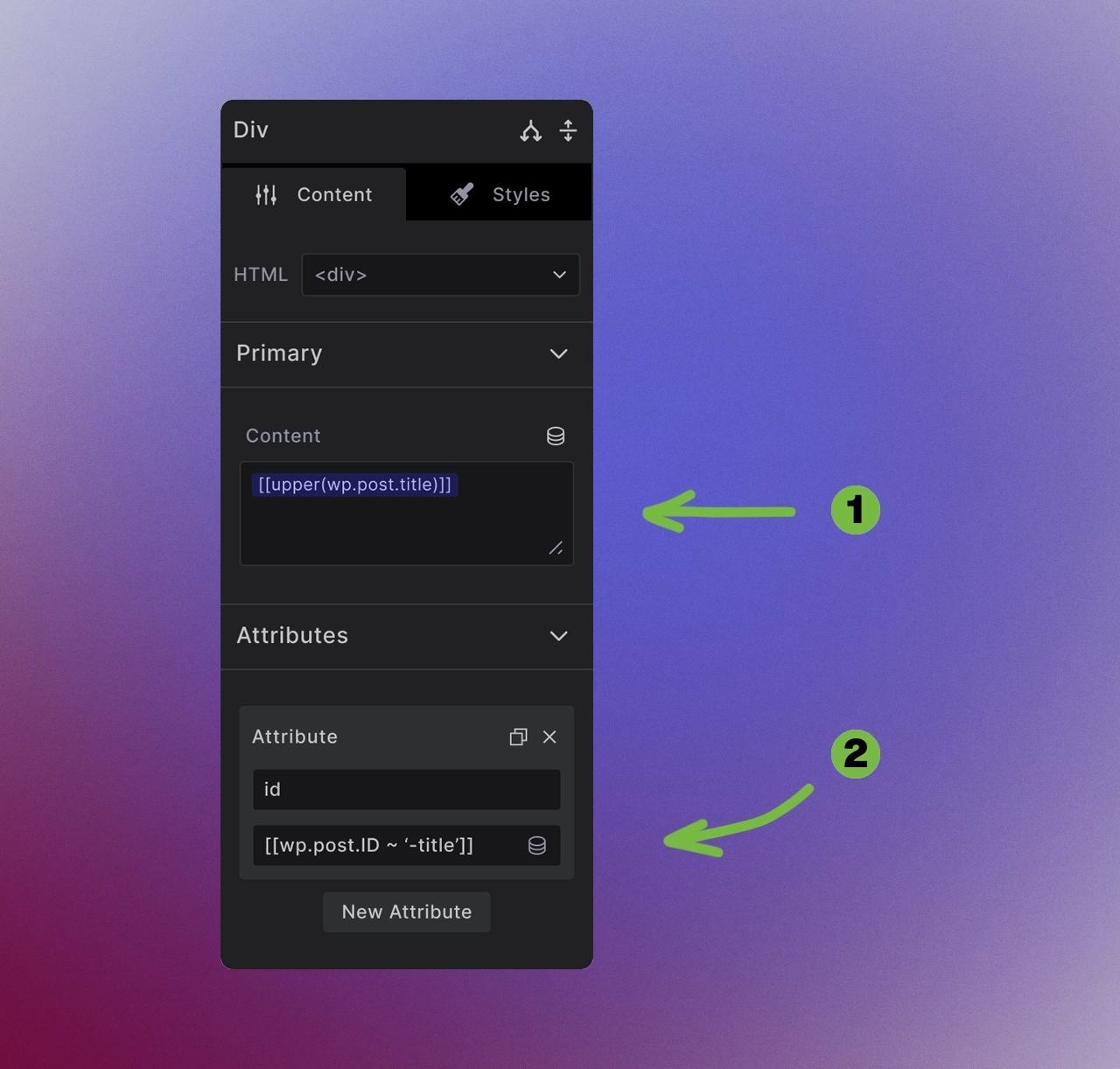
<!-- Inside Templates-->
[[upper(post_title)]]
[[limit_words(post_excerpt, 25, '...')]]
[[is_user_logged_in() ? 'Members Only Content' : 'Please log in']]

<!-- Inside Collection scope-->
<!-- Template element -->
{{upper(post_title)}}
{{limit_words(post_excerpt, 25, '...')}}
{{is_user_logged_in() ? 'Members Only Content' : 'Please log in'}}
GraphQL Queries
Transform data within custom queries using expression_result() Pro feature :
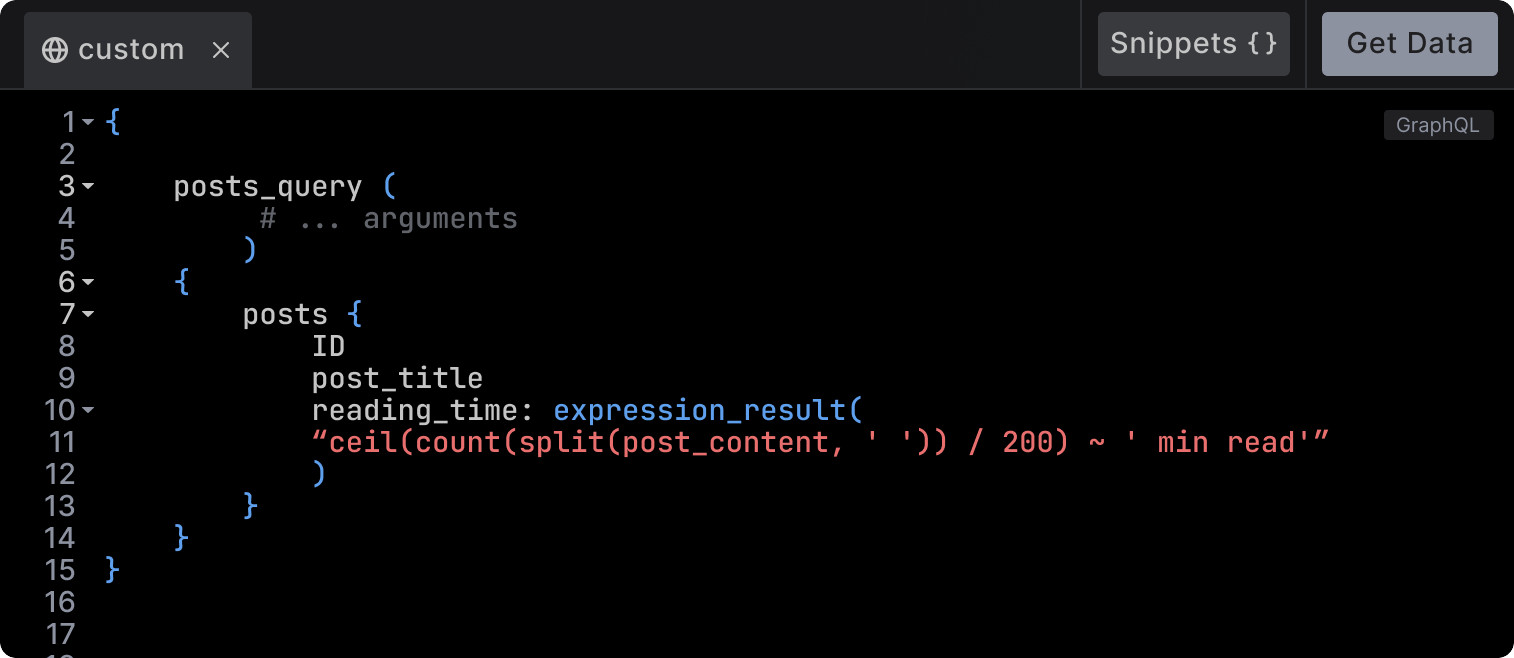
{
  posts_query {
    posts {
      post_title
      reading_time: expression_result(
        expression: "ceil(count(split(post_content, ' ')) / 200) ~ ' min read'"
      )
    }
  }
}
Learn more about using expressions in custom queries: Expression Result →
Condition Builder
Create simple or advanced conditional logic for element visibility:
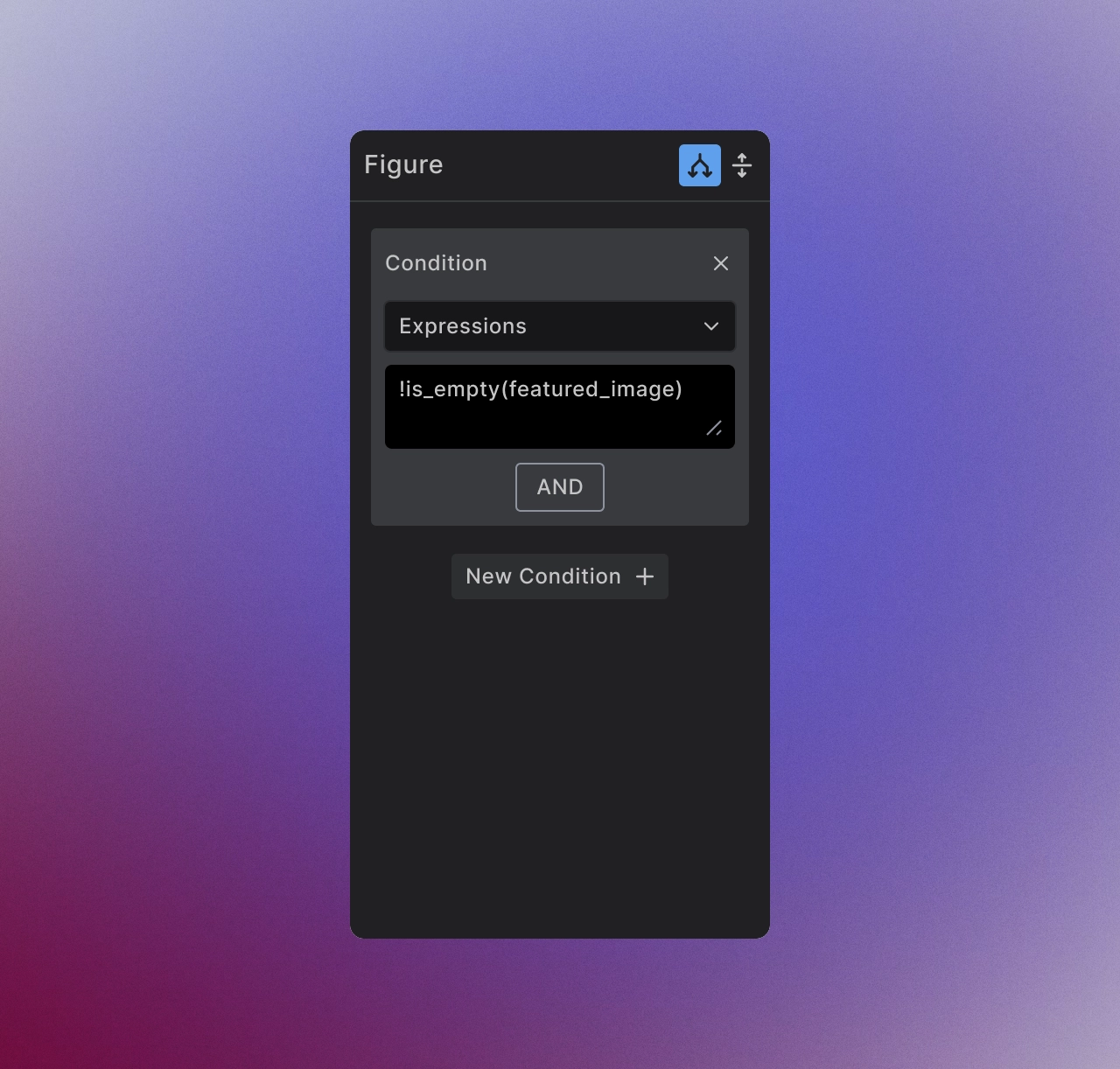
Explore condition building and expression-based visibility controls in the Conditions overview →.
Expression vs Other Approaches
| Feature | Expression Language | PHP Functions | Static Content |
|---|---|---|---|
| Learning Curve | Simplified syntax | Full PHP codeing knowledge | None |
| Visual Builder | ✅ Fully integrated | ❌ Code required | ✅ Direct entry |
| Data Transformation | ✅ 100+ built-in functions | ✅ Unlimited flexibility | ❌ Fixed values |
| Conditional Logic | ✅ Built-in operators | ✅ Full programming logic | ❌ Static only |
| Safety | ✅ Read-only, secure | ⚠️ Can modify database | ✅ No code execution |
| Performance | ✅ Optimized and cached | ⚠️ Depends on implementation | ✅ Fastest |
| Maintenance | ✅ Visual, template-based | ❌ Code files to manage | ✅ WYSIWYG |
When to Use Each
Use Expression Language for:
- Data formatting and transformation
- Mathematical calculations
- Conditional display logic
- String manipulation
- Date and time formatting
- User personalization
Use PHP Functions for:
- Edge case complex business logic
- Database modifications
Use Static Content for:
- Fixed text that never changes
- Design elements and labels
- Legal text and disclaimers
Context Awareness and Data Access
Expression Language automatically accesses your current template context:
Template Context Data
- Post templates: Current post data (
post_title,post_content,featured_image) - Archive templates: Archive information (
archive.title,archive.posts_query.posts) - User templates: User profiles (
current_user.display_name,current_user.roles) - Global context: Site-wide data (
option_value, navigation, custom fields)
WordPress Integration
Access any WordPress data through the wp context:
[[wp.post.post_title]]              // Current post title
[[wp.current_user.display_name]]    // Logged-in user name
[[wp.option_value__site_name]]      // WordPress option
[[wp.archive.posts_query.posts]]    // Archive post list

// Or if you are using custom made data source
[[custom_name.post.post_title]]              // Current post title
[[custom_name.current_user.display_name]]    // Logged-in user name
[[custom_name.option_value__site_name]]      // WordPress option
[[custom_name.archive.posts_query.posts]]    // Archive post list
Learn about available WordPress data fields: Data Fields Reference →
Why Expression Language Matters
Efficiency - Transform and calculate data without leaving the visual builder
No context switching between design and code. Traditional approaches require:
- Opening code editors or functions.php
- Writing custom PHP functions
- Testing and debugging separately
- Going back to the builder to implement
With Expression Language, you write transformations directly where you need them:
- Immediate visual feedback in the builder
- Real-time preview of expression results
- No file management or deployment steps
- Complete workflow stays within Builderius interface
Example: Instead of creating a custom PHP function to format prices, you write [[sprintf('$%.2f', price)]] directly in your element content.
Accessibility - JavaScript-like syntax that's approachable for designers while powerful enough for developers
For Designers:
- Familiar syntax if you've used any modern web development
- Visual autocomplete and error highlighting
- No PHP knowledge required
- Functions have descriptive names like
limit_words(),upper(),date()
For Developers:
- Full expression evaluation with 100+ built-in functions
- Complex conditional logic and nested operations
- Array processing and data transformation capabilities
- Performance optimization through caching
Learning Curve:
- Basic usage: 5 minutes to understand
[[field_name]] - Simple functions: 15 minutes to use
upper(),count(),date() - Conditional logic: 30 minutes to master
condition ? true : false - Advanced patterns: Hours, not days to build complex expressions
Safety - Read-only operations ensure expressions can't break your site or compromise security
Security Benefits:
- No database writes: Expressions can only read data, never modify it
- No file system access: Cannot create, delete, or modify files
- No external requests: Cannot make HTTP calls or API requests
- Sandboxed execution: Runs in isolated environment
Site Protection:
- Cannot break functionality: Worst case is display issues, not site crashes
- No infinite loops: Automatic execution limits prevent runaway expressions
- No memory exhaustion: Built-in resource limits protect server performance
- Error isolation: Expression errors don't affect rest of page
Comparison to PHP:
- PHP functions can modify database, delete files, crash sites
- Expression Language is designed for safe data transformation only
- Perfect for template-level logic without security risks
Performance - Optimized execution and automatic caching for fast, efficient data processing
Optimization Features:
- Compiled expressions: Parsed once, executed efficiently
- Automatic caching: Results cached based on data dependencies
- Lazy evaluation: Only processes expressions when data changes
- Memory efficient: Minimal overhead compared to PHP alternatives
Performance Benefits:
- Faster than custom PHP: Pre-compiled execution vs interpreted code
- Reduced database load: Smart caching reduces redundant queries
- Client-side friendly: Results can be cached for static generation
- Scalable: Performance stays consistent as site grows
Real-World Impact:
- Page load times remain fast even with complex expressions
- Server resources used efficiently
- Scales to high-traffic sites without performance degradation
- Better than multiple WordPress function calls
Integration - Works seamlessly across all Builderius interfaces
Universal Availability:
- Element content: Text, headings, any content field
- Element attributes: Image sources, link URLs, CSS classes, data attributes
- Component properties: Pass calculated values to custom components
- GraphQL queries: Transform data within
expression_result() - Condition builder: Complex conditional logic for element visibility
- Style properties: Dynamic CSS values and responsive breakpoints
Consistent Syntax:
- Same expression language everywhere in Builderius
- Learn once, use everywhere approach
- No different syntaxes for different contexts
- Predictable behavior across all use cases
Builder Integration:
- Autocomplete suggestions in all expression contexts
- Syntax highlighting and error detection
- Real-time preview where possible
- Unified documentation and help system
Maintainability - Visual, template-based expressions that update automatically when your data structure changes
Template-Based Benefits:
- Visual debugging: See expressions directly in context where they're used
- No hidden code: All logic visible in the builder interface
- Version control: Templates save expression logic along with design
- Team collaboration: Designers can understand and modify expressions
Automatic Updates:
- Field name changes: Update once, expressions adapt automatically
- Data structure changes: WordPress field changes flow through expressions
- Plugin updates: ACF, MetaBox field changes don't break expressions
- Content migration: Expressions adapt to new content without manual updates
Long-term Maintenance:
- Self-documenting: Expressions show intent clearly
- Future-proof: No custom functions to maintain across WordPress updates
- Backup-friendly: Expressions saved with templates, not in code files
- Migration-ready: Move between sites easily with template exports
Getting Started with Expressions
Learning Path
Level 1: Basic data display
[[post_title]]
[[current_user.display_name]]
Level 2: Simple functions
[[upper(post_title)]]
[[count(post_content)]]
Level 3: Conditional logic
[[is_user_logged_in() ? 'Welcome!' : 'Please log in']]
Level 4: Complex transformations
[[sprintf('$%.2f', price + (price * tax_rate / 100))]]
Next Steps
Expression Language opens up powerful data manipulation capabilities throughout Builderius. Start with simple examples and gradually build complexity as you become comfortable with the syntax.
Master expression syntax, operators, and all built-in functions:
- Expression Syntax → - Core language rules and structure
- Operators → - Comparison, logical, and mathematical operators
- Built-in Functions → - 100+ functions for every data transformation need
- Expression Examples → - Real-world patterns and use cases
New to dynamic data? Start with the fundamentals: Dynamic Data Introduction →
Expression Language transforms static templates into intelligent, data-driven experiences that automatically adapt to your content and users. Master these concepts, and you'll build more dynamic, personalized, and maintainable WordPress sites with Builderius.