MetaBox Fields
MetaBox integration
This article covers MetaBox integration with built-in dynamic data in Builderius. MetaBox fields appear automatically in the Dynamic Data dropdown when you create and populate them, and can be added to any element without custom queries.
How MetaBox Fields Appear in Builderius
MetaBox fields are automatically available in the Dynamic Data dropdown. Builderius supports all field types in all WordPress locations. There are 3 types of fields:
- Simple Fields (text, number, select...) appear as single options you can click to add
- Object Fields (images, files, post relationships...) appear within expandable options as subfields
- Array Fields (cloneable groups...) can be used as Collection data sources
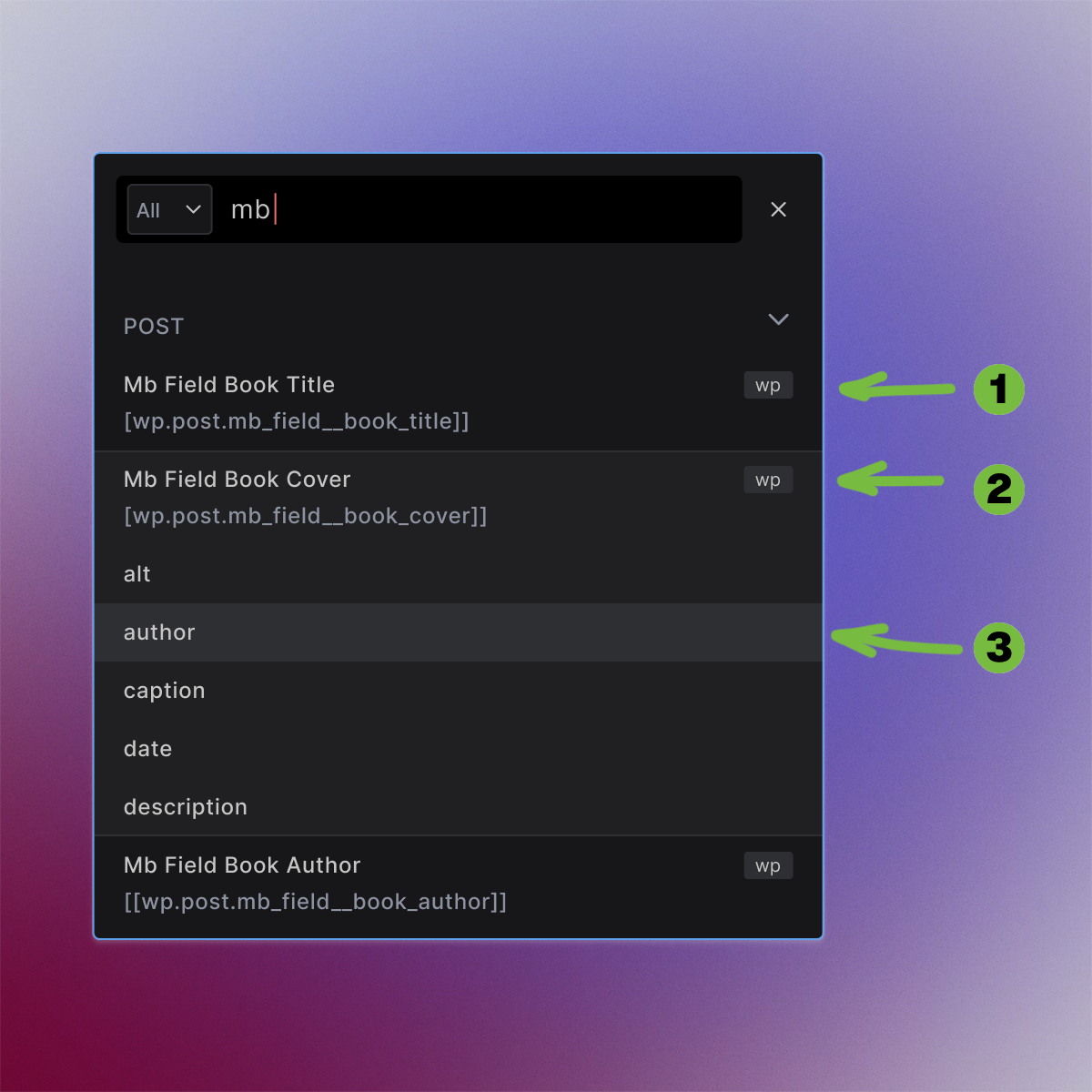
Adding Simple and Complex Fields
- Simple MetaBox fields appear the same as built-in fields and can be added with a single click
- Complex MetaBox fields that have subfields (these are object fields) appear as toggles. Once you click such a field, it expands to show subfields
- MetaBox Subfields act the same way as simple fields and can be added with a single click
Adding fields with multiple instances
Multiple instance fields expose their data as an array. They have to be added to Collection element, and their content is then added same way as other loops. These fields are:
- Cloneable group fields
- Multiple post/user/taxonomy relationship fields
- Multiple image/file fields
- Any field with cloneable option enabled
Naming Convention
Simple Fields
| Context | Dynamic Data Tag Pattern | Description |
|---|---|---|
| Posts/Pages | [[wp.post.mb_field__field_id]] | Text, select, date, number, checkbox fields |
| Settings Pages | [[wp.settings_page_name__field_name]] | Site-wide settings page field values (Pro) |
| Users | [[wp.current_user.mb_field__field_id]] | User profile simple field values (Pro) |
| Post Authors | [[wp.post.author.mb_field__field_id]] | Post author simple field values (Pro) |
Complex Fields (Objects with Subfields)
| Context | Dynamic Data Tag Pattern | Description |
|---|---|---|
| Posts/Pages | [[wp.post.mb_field__field_id.subfield]] | Image, file, background, post, user, taxonomy fields |
| Settings Pages | [[wp.settings_page_name__field_name.subfield]] | Settings page object fields with expandable properties (Pro) |
| Users | [[wp.current_user.mb_field__field_id.subfield]] | User object fields with expandable properties (Pro) |
| Post Authors | [[wp.post.author.mb_field__field_id.subfield]] | Author object fields with expandable properties (Pro) |
Array Fields (Collection Data Sources)
| Context | Dynamic Data Tag Pattern | Description |
|---|---|---|
| Posts/Pages | [[wp.post.mb_field__field_id]] → {{mb_field__subfield}} | Cloneable groups, multiple relationships |
| Settings Pages | [[wp.settings_page_name__field_name]] → {{mb_field__subfield}} | Settings page cloneable groups (Pro) |
| Users | [[wp.current_user.mb_field__field_id]] → {{mb_field__subfield}} | User cloneable fields (Pro) |
| Post Authors | [[wp.post.author.mb_field__field_id]] → {{mb_field__subfield}} | Author cloneable fields (Pro) |
Field Types in Dynamic Data
Simple Field Types
- Text, Textarea, Number, Email, URL → Direct values:
[[wp.post.mb_field__field_id]] - Select, Radio, Checkbox List → Selected values:
[[wp.post.mb_field__field_id]] - Switch, Button Group → Selected values:
[[wp.post.mb_field__field_id]] - Date, Time, Datetime → Formatted dates:
[[wp.post.mb_field__field_id]] - Color → Color values:
[[wp.post.mb_field__field_id]]
Complex (object) Field Types
- Image → Expandable with
.url,.alt,.title,.width,.heightsubfields - File → Expandable with
.url,.name,.path,.titlesubfields - Background → Expandable with
.color,.image,.position,.sizesubfields - Post → Expandable with
.post_title,.ID,.guid,.post_contentsubfields - User → Expandable with
.display_name,.user_email,.avatar_urlsubfields - Taxonomy → Expandable with
.name,.slug,.descriptionsubfields
Array Field Types
- Group (Cloneable) → Use as Collection data source:
[[wp.post.mb_field__group_id]] - Post (Multiple) → Use as Collection for multiple posts
- User (Multiple) → Use as Collection for multiple users
- Image (Multiple) → Use as Collection for multiple images
Usage Examples
- Simple Fields
- Complex Fields
- Group Fields
Text, Number, Select Fields:
<!-- Event page example -->
<div class="event-details">
  <h2>[[wp.post.title]]</h2>
  <div class="date">[[wp.post.mb_field__event_date]]</div>
  <div class="time">[[wp.post.mb_field__event_time]]</div>
  <div class="venue">[[wp.post.mb_field__venue_name]]</div>
  <div class="capacity">Max attendees: [[wp.post.mb_field__max_attendees]]</div>
</div>
Image, File and Relationship Fields:
<!-- Portfolio item -->
<figure class="portfolio-item">
  <img src="[[wp.post.mb_field__portfolio_image.url]]"
       alt="[[wp.post.mb_field__portfolio_image.alt]]"
       width="[[wp.post.mb_field__portfolio_image.width]]"
       height="[[wp.post.mb_field__portfolio_image.height]]">
  <figcaption>[[wp.post.mb_field__portfolio_image.title]]</figcaption>
</figure>

<!-- Document download -->
<div class="document-download">
  <a href="[[wp.post.mb_field__document.url]]" target="_blank">
    Download [[wp.post.mb_field__document.title]] ([[wp.post.mb_field__document.name]])
  </a>
</div>
Group Fields (Collection Elements):
<!-- Team members group -->
<!-- Collection data source: [[wp.post.mb_field__team_members]] -->
<!-- Inside Collection template: -->
<div class="team-member">
  <img src="{{mb_field__photo}}" alt="{{mb_field__name}}">
  <h4>{{mb_field__name}}</h4>
  <p>{{mb_field__position}}</p>
  <p>{{mb_field__department}}</p>
  <a href="mailto:{{mb_field__email}}">Contact</a>
</div>
Key Differences: MetaBox vs ACF
| Feature | MetaBox | ACF |
|---|---|---|
| Tag prefix | mb_field__ | acf_field__ |
| Field identifier | Uses field ID | Uses field name |
| Case conversion | Lowercase | As-is |
| Example | [[wp.post.mb_field__my_field]] | [[wp.post.acf_field__my_field]] |
| Settings Pages | [[wp.mb.page_name__field]] | [[wp.acf_options_field__field]] |
| Group Fields | Cloneable groups | Repeater fields |