Commits
A commit is a saved point on the dev branch. Where History remembers every small step until you reload, commits stay: they let you look at an earlier save of your work and bring it back.
The Commits Tab
Open Version tracking from the top bar and switch to the Commits tab. It lists the saved points since the latest release, newest first.
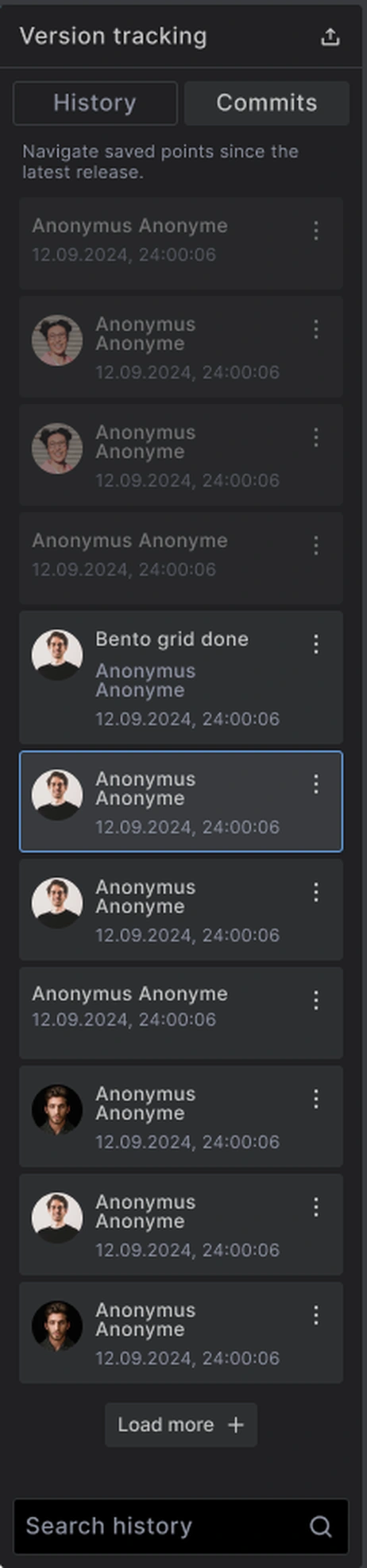
Each commit shows who saved it and when. A commit can also have a title. Use Load more at the bottom for older ones.
Naming a Commit
A title turns an anonymous save into something you can find again.
- Open the menu on a commit (the three dots)
- Choose Edit the title
- Type a short name, such as Bento grid done
Name the points that matter: before a big change, or when a part of the design is finished.
Previewing a Commit
Click a commit to preview it. The canvas shows your site as it was at that point, and a notice reminds you: You are only previewing this version!
Nothing changes yet. A preview is only a look.
- With the Commits tab active, the arrows in the top bar step from one commit to the next
- You can close the panel and stay in the preview, to see the whole canvas
- To use History again, exit the commit preview first
Restoring a Commit
When the preview shows the version you want back:
- Open the commit's menu
- Choose Restore this commit
A commit covers everything together: templates, components and global settings. Restoring one brings all of them back to that point.
Restoring an older commit can remove things made after it, and bring back things deleted after it. Builderius warns you on each affected item, for example: This template was created after this commit, reverting to this commit will permanently delete this template.
Commits and Releases
Commits are your saved points between releases. Once you create a release, that release becomes the long-term record, and the list of commits starts again from there.
Best Practices
Name commits at natural stopping points. A title is the difference between finding a version and guessing.
Preview before you restore. A restore affects the whole site, not only the template you are on.
Create a release for anything you want to keep. Commits are for work in progress; releases are for milestones.
Common Issues
- I cannot open History: Exit the commit preview first
- Restoring removed a template: That template was created after the commit. The warning on the commit said so
- I do not see older commits: The list shows saved points since the latest release. Older work is kept in that release
Next steps: