Saving and History
Everything you do in the builder happens on the dev branch. This page covers the two things you use all the time while you work: saving, and going back with History.
Saving
Use the Save button in the top bar. The arrow next to it opens a menu with two choices:

- Save to Development - stores your work on the dev branch. Visitors do not see it
- Publish to Live - makes your work live on production. See Staging & Releases
Until you save, your changes exist only in your browser. If you close a tab with unsaved changes, Builderius warns you first.
Saving is safe. It never changes what visitors see. Save often.
Undo and Redo
Use the arrows in the top bar, or the keyboard:
- Undo - Ctrl + Z (Cmd + Z on Mac)
- Redo - Ctrl + Shift + Z (Cmd + Shift + Z on Mac)
Undo works across everything you have open. If you changed a template and then a component, undoing walks back through both.
History takes you to the change. Each step opens the exact place where it happened: the template or component it was made in, even if that is not the one in front of you, and the panel where you made it. You always see what is being undone.
When there is nothing more to undo, Builderius tells you: Nothing left to restore to.
The History Panel
Click the History button between the undo and redo arrows to open Version tracking. It has two tabs: History and Commits.
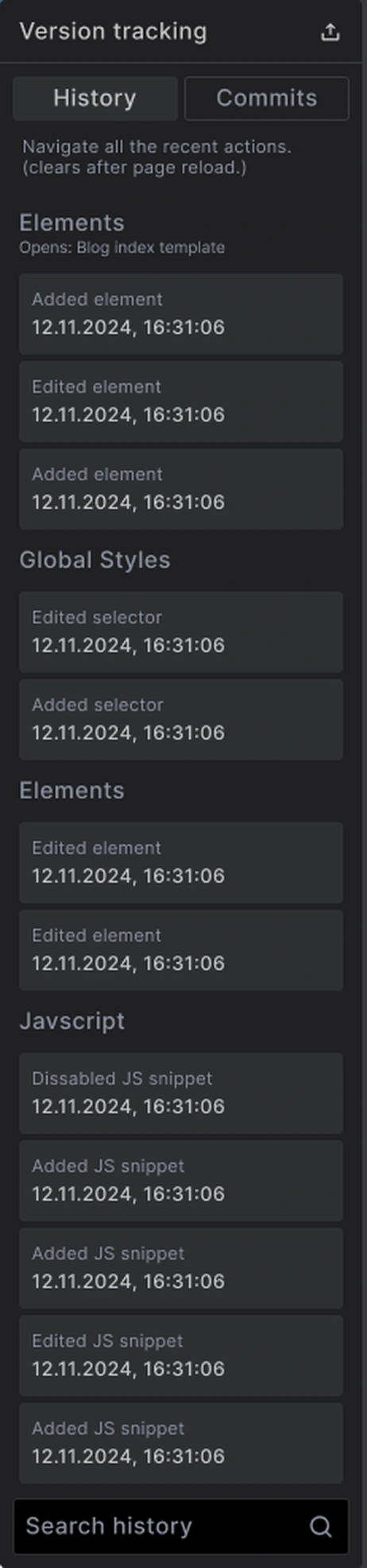
The History tab lists every recent action, such as Added element, Edited selector or Added JS snippet, grouped by where it happened: a template, Global Styles, JavaScript.
- Click any step to go back to that point. Builderius opens the template or component where that change was made, and the panel it was made in, so you see the change in its place
- Everything stays editable, with no confirmation needed
- Search history at the bottom finds a step by name
- If you go back and then make a new change, the steps after that point are dropped
History is for the work you are doing right now. It clears when you reload the page. For points you can return to later, use Commits.
History or Commits?
| History | Commits | |
|---|---|---|
| What it tracks | Every action | Saved points |
| How long it lasts | Until you reload | Kept on the dev branch |
| Use it for | Undoing recent steps | Going back to an earlier save |
Common Issues
- Undo opened another template or component: That is where the change was made. History always shows you the change in its place
- My history is empty: History clears when the page reloads. Look in the Commits tab for saved points
- Visitors cannot see what I saved: Saving stores work on dev. Publish to make it live
Next steps: