Scopes
A scope decides where a style lives and when it loads. Builderius has three:
| Scope | Loads | Use it for |
|---|---|---|
| Global | On every page | Your design system: variables, base styles, shared classes |
| Template | Only on pages that use this template | Styles only this template needs |
| Component | Only on pages where this component appears | Styles that belong to the component |
This keeps pages light. A page loads the global styles plus the styles of its own template and components, and nothing else.
Switching Scope
Use the scope switch at the top of the Styles tab.
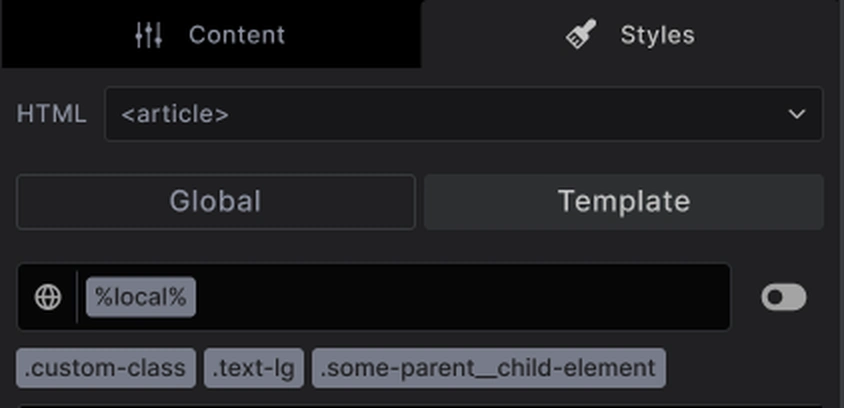
Which options you see depends on what you are editing:
- Editing a template or page: Global and Template
- Editing a component: Global and Component
Everything you create while a scope is active is saved in that scope: selectors, their styles and CSS variables. The Selectors panel in the Navigator has its own scope switch, synced with this one, and All CSS in Code mode follows it too.
How Scopes Work Together
Global styles apply everywhere, so an element on your template is styled by both scopes at once: first the global rules, then the template rules on top.
That lets you keep one definition and adjust it where needed. A .card class can be defined in Global, and one template can add its own extra rules for .card without touching the rest of the site.
Best Practices
Start global: Anything you will use on more than one template belongs in Global.
Keep components self-contained: A component that carries its own styles works anywhere you drop it.
Use Template for exceptions: A landing page with its own look is a good case for Template scope.
Common Issues
- I cannot find my class: It may live in the other scope. Flip the scope switch, or look in the Selectors panel, which lists every selector on your site
- A style applies but I cannot see where it is set: It probably comes from Global while you are looking at Template, or the other way round
- My style is missing on another template: It was created in Template scope. Create it in Global instead
Next steps: