Audio
The Audio element embeds audio content on your page using the HTML <audio> tag. It provides a complete audio player with customizable controls and multiple source options for cross-browser compatibility and optimal delivery.
This is a container element that can be changed into any HTML tag. Learn more about element types →
This element creates multiple nested HTML elements to provide advanced and flexible functionality. Learn more →
Audio Element Settings
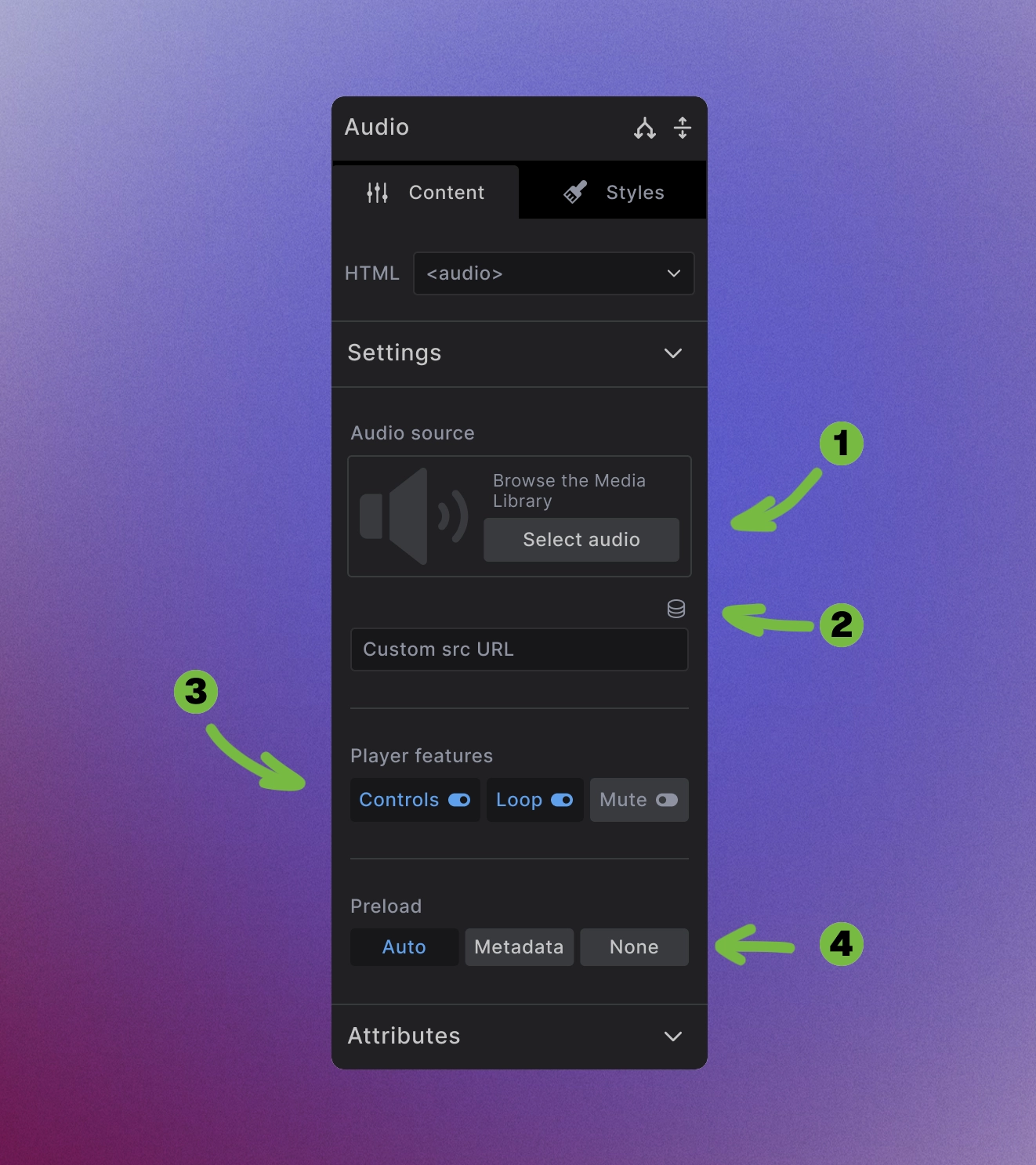
The Audio element provides comprehensive audio configuration options:
-
Media Library Audio Source: Select audio files from the media library or upload new audio files.
-
Advanced Audio Sources: Use dynamic data source or enter direct URLs for external audio sources or CDN-hosted audio.
-
Player features: Control audio behavior with toggles for:
- Controls - Show/hide audio player controls
- Loop - Automatically restart audio when it ends
- Mute - Start audio with sound muted
-
Preload behavior: Control how much audio data loads initially:
- Auto - Load the entire audio file
- Metadata - Load only audio metadata (duration, format)
- None - Don't preload anything
Audio Source Management
- Format compatibility: Provide multiple audio formats for maximum browser support
- External sources: Link to audio hosted on CDNs or external platforms using custom URLs
<audio controls>
  <source src="audio.ogg" type="audio/ogg">
  <source src="audio.mp3" type="audio/mp3">
  Your browser doesn't support audio playback.
</audio>
Player Features Configuration
Controls toggle: Enable or disable the built-in audio player interface:
<!-- With controls -->
<audio controls src="audio.mp3"></audio>

<!-- Without controls (often used with custom JavaScript) -->
<audio src="audio.mp3"></audio>
Loop behavior: Control playback repetition:
<!-- Loop audio continuously -->
<audio controls loop src="audio.mp3"></audio>
Mute option: Starting audio muted is often required for autoplay functionality and improves user experience:
<!-- Start muted -->
<audio controls muted src="audio.mp3"></audio>
Preload Strategies
Auto preloading: Downloads the entire audio file immediately - use sparingly to avoid bandwidth waste:
<audio controls preload="auto" src="audio.mp3"></audio>
Metadata preloading: Loads audio information without downloading content - good balance of UX and performance:
<audio controls preload="metadata" src="audio.mp3"></audio>
No preloading: Minimal initial load - best for mobile or bandwidth-conscious situations:
<audio controls preload="none" src="audio.mp3"></audio>
Accessibility Considerations
Transcripts and descriptions: Provide text alternatives for audio content:
<audio controls>
  <source src="podcast.mp3" type="audio/mp3">
  <track kind="descriptions" src="descriptions.vtt" srclang="en" label="Audio Description">
</audio>
<p><a href="transcript.html">Read transcript</a></p>
- Keyboard navigation: Native audio controls are keyboard accessible by default
- Screen reader support: Provide descriptive text and ensure audio content is announced properly
Performance Best Practices
- Optimize audio files: Compress audio appropriately for web delivery while maintaining acceptable quality
- Choose appropriate preload settings: Balance user experience with bandwidth consumption based on your audience
- Format considerations: Use efficient formats like MP3 or OGG for smaller file sizes
- Loading strategy: Place audio elements strategically to avoid impacting initial page load performance
Browser Compatibility
- Multiple formats: Provide fallback formats for comprehensive browser support
- Progressive enhancement: Always include fallback content for browsers without audio support
<audio controls>
  <source src="audio.ogg" type="audio/ogg">
  <source src="audio.mp3" type="audio/mp3">
  <source src="audio.wav" type="audio/wav">
  <p>Your browser doesn't support audio playback.
     <a href="audio.mp3">Download the audio</a> instead.</p>
</audio>
Next steps: